Simpan BITCOIN mu untuk masa depan. Ayo menambang dan GRATIS.

MIUI 7 5.12.24 Update - Xiaomi Redmi 2 HM2018411


***Redmi 2 China Develepor Only. This patch will update your ROM from MIUI 7 5.12.24 to MIUI 7 5.12.31. This patch doesn't work on Global ROM.


CHANGELOGS
---------------------------------------------------------------------------
[Lockscreen, Status Bar, Notification Bar]
Optimization - Fingerprint scanning process (Redmi Note 3) (12-29)
Fix - Press 'Back' or 'Menu' button immediately after locking the screen would wake it (Mi 4c) (12-29)

[Voice Assistant]
Fix - Several voice commands execution errors (12-29)

[Video Phone]
New - Brand new UI (12-29)


HOW TO UPDATE
---------------------------------------------------------------------------
1. Download Incremental ROM Pack below

2. Copy to Internal Storage

3. Open Updater


4. On the top right corner, tap Menu


5. Choose update package


6. Now tap on miui-ota-wt88047-5.12.10-5.12.17-131c2ef9a2-4.4.zip


7. Phone will automatically reboot

8. You're done.

DOWNLOAD
---------------------------------------------------------------------------
miui-ota-wt88047-5.12.24-5.12.31-c3b6354ddb-4.4.zip (42MB)

0 $type={blogger}:

CyanogenMod12.1 - Samsung Galaxy Ace 3 GT-S7270 (30 Desember 2015)


STATUS
- Still Developing

INFO
- Belum stabil
- Kemungkinan bug masih ada
- Buat Full backup sebelum menginstall/update

PERUBAHAN
Create -androidkernel toolchain symlinks.
This commit creates a set of toolchain symlinks for kernel builds that
point to the regular toolchain binaries, except with ld pointing to bfd
instead of gold.

ROM
CyanogenMod12.1 UNOFFICIAL logan

GAPPS
pa_gapps-modular-pico-5.1-20150315-signed.zip

THANKS TO
zim555

LAINNYA
Philz Touch Recovery GT-S7270
For Faster Wipe Data, Cache & System GT-S7270
FM Radio on Lollipop GT-S7270
Pasang Exposed Framework di Lollipop 5.1.1 SDK-22 GT-S7270

11 $type={blogger}:

CyanogenMod12.1 - Samsung Galaxy Ace 3 GT-S7270 (29 Desember 2015)


STATUS
- Still Developing

INFO
- Belum stabil
- Kemungkinan bug masih ada
- Buat Full backup sebelum menginstall/update

PERUBAHAN
- SELinux: Fix possible NULL pointer dereference in selinux_inode_permission()
- Add MODULE_LICENSE and NOTICE files
- Automatic translation import
- NavigationBar : Switch to display orientation from config orientation
Config orientation seems to incorrectly report states and causes
issues where incorrect view is shown. Switch to using display orientation
and in doing so, mirror aosp logic for view switching.

ROM
CyanogenMod12.1 UNOFFICIAL logan

GAPPS
pa_gapps-modular-pico-5.1-20150315-signed.zip

THANKS TO
zim555

LAINNYA
Philz Touch Recovery GT-S7270
For Faster Wipe Data, Cache & System GT-S7270
FM Radio on Lollipop GT-S7270
Pasang Exposed Framework di Lollipop 5.1.1 SDK-22 GT-S7270

0 $type={blogger}:

CyanogenMod12.1 - Samsung Galaxy Ace 3 GT-S7270 (28 Desember 2015)


STATUS
- Still Developing

INFO
- Belum stabil
- Kemungkinan bug masih ada
- Buat Full backup sebelum menginstall/update

PERUBAHAN
- SELinux: Fix possible NULL pointer dereference in selinux_inode_permission()
- Add MODULE_LICENSE and NOTICE files
- Automatic translation import
- NavigationBar : Switch to display orientation from config orientation
Config orientation seems to incorrectly report states and causes
issues where incorrect view is shown. Switch to using display orientation
and in doing so, mirror aosp logic for view switching.

ROM
CyanogenMod12.1 UNOFFICIAL logan

GAPPS
pa_gapps-modular-pico-5.1-20150315-signed.zip

THANKS TO
zim555

LAINNYA
Philz Touch Recovery GT-S7270
For Faster Wipe Data, Cache & System GT-S7270
FM Radio on Lollipop GT-S7270
Pasang Exposed Framework di Lollipop 5.1.1 SDK-22 GT-S7270

1 $type={blogger}:

MIUI 7 5.12.17 Update - Xiaomi Redmi 2 HM2018411


***Redmi 2 China Develepor Only

This patch will update your ROM from MIUI 7 5.12.17 to MIUI 7 5.12.24. This patch doesn't work on Global ROM.


CHANGELOGS

[Messaging]
Fix - When recipients exceeded one line, the upper and lower parts might get cut (12-24)

[Lockscreen, Status Bar, Notification Bar]
Fix - Sometimes status bar disappeared (12-24)

[Home screen]
Fix - Home screen FC error after doing a factory data reset (12-18)

[Mi Cloud]
New - Added account lock after flashing phone in Find device. Avoid risks of lost phone being used by others (12-22)


HOW TO UPDATE

1. Download Incremental ROM Pack below

2. Copy to Internal Storage

3. Open Updater


4. On the top right corner, tap Menu


5. Choose update package


6. Now tap on miui-ota-wt88047-5.12.10-5.12.17-131c2ef9a2-4.4.zip


7. Phone will automatically reboot

8. You're done.

DOWNLOAD
miui-ota-wt88047-5.12.17-5.12.24-d2ca187664-4.4.zip (24MB)

0 $type={blogger}:

MIUI 7 5.12.10 Update - Xiaomi Redmi 2 HM2018411


***Redmi 2 China Develepor Only

This patch will update your ROM from MIUI 7 5.12.10 to MIUI 7 5.12.17. This patch doesn't work on Global ROM.


CHANGELOGS

[Backup]
'Back up apps' has been updated to 'Back up device'. System settings can now be backed up.

[Music]
New - Added music videos section (12-16)
Optimization - In random playing mode, pressing 'Play all' in song list will not always start playing from the first song in the list (12-15)

[Weather]
New - Brand new Weather app. Added 24 hours forecast, air quality forecast, wind speed forecast (12-11)

[Cleaner]
New - New version of Deep clean. Added available storage space (12-15)
New - New version of photos cleaning feature. Added duplicate photos/accidental photos/under and overexposed/screenshots sections (12-15)
New - Added 'save the sharpest photos' option when cleaning duplicate photos (12-15)
Optimization - Logic of defining rarely used apps (12-15)

[Mi Cloud]
New - 'Back up apps' is updated to 'Back up device'. Support backing up system settings. Allow restoring easily (12-15)


HOW TO UPDATE

1. Download Incremental ROM Pack below

2. Copy to Internal Storage

3. Open Updater


4. On the top right corner, tap Menu


5. Choose update package


6. Now tap on miui-ota-wt88047-5.12.10-5.12.17-131c2ef9a2-4.4.zip


7. Phone will automatically reboot

8. You're done.

DOWNLOAD
miui-ota-wt88047-5.12.10-5.12.17-131c2ef9a2-4.4.zip (27MB)

0 $type={blogger}:

Brightness patch untuk CM12.1 Ace 3 GT-S7270

Special Thanks to:
falkon117 at XDA Forum for replay and help Me to download this patch.

Special Thanks to:
zim555 at XDA Forum for telling Me "In new builds for logan and logands no need patchlight."


Ucapan terima kasih untuk falkon117 yang telah mendownload dan me-reply trit Saya di XDA. Ini dia file patchlight.zip untuk CyanogenMod12.1 Samsung Galaxy Ace 3 GT-S7270. Semoga file bisa membantu user Ace 3 GT-S7270.

Dan ucapan terma kasih kepada zim555 yang telah memberikan info soal patchlight. Jika kawan-kawan kurang paham English :D, berikut terjemahannya :

"Pada build yang baru untuk logan (GT-S7270) dan logans (GT-S7272), tidak membutuhkan lagi patchlight."

Build yang dimaksud ada cm-12.1-20151222-UNOFFICIAL-logan.zip

Saya juga balik nanya ke zim555, mudah-mudahan cepat ada konfirmasi soal CyanogenMod13. Ditunggu aj yah :)

Downloads
patchlight.zip (XDA)
patchlight.zip (Mediafire)

8 $type={blogger}:

CyanogenMod12.1 - Samsung Galaxy Ace 3 GT-S7270 (22 Desember 2015)


STATUS
- Still Developing

INFO
- Belum stabil
- Kemungkinan bug masih ada
- Buat Full backup sebelum menginstall/update

PERUBAHAN
- prebuilts/cmsdk: Finalized api level 3.
- cmsdk: Add finalized docs for cantaloupe.

ROM
cm-12.1-20151222-UNOFFICIAL-logan.zip (Mediafire)

GAPPS
pa_gapps-modular-pico-5.1-20150315-signed.zip

LAINNYA
Philz Touch Recovery GT-S7270
For Faster Wipe Data, Cache & System GT-S7270
FM Radio on Lollipop GT-S7270
Pasang Exposed Framework di Lollipop 5.1.1 SDK-22 GT-S7270

31 $type={blogger}:

CyanogenMod12.1 - Samsung Galaxy Ace 3 GT-S7270 (21 Desember 2015)


STATUS
- Still Developing

INFO
- Belum stabil
- Kemungkinan bug masih ada
- Buat Full backup sebelum menginstall/update

PERUBAHAN
-
-
-

ROM
cm-12.1-20151221-UNOFFICIAL-logan.zip (Mediafire)

GAPPS
pa_gapps-modular-pico-5.1-20150315-signed.zip

LAINNYA
Philz Touch Recovery GT-S7270
For Faster Wipe Data, Cache & System GT-S7270
FM Radio on Lollipop GT-S7270
Pasang Exposed Framework di Lollipop 5.1.1 SDK-22 GT-S7270

3 $type={blogger}:

MIUI 7 China Developer ROM 5.12.17 - Xiaomi Redmi 2 HM2018411


Changelogs
[Music]
New - Added music videos section (12-16)
Optimization - In random playing mode, pressing 'Play all' in song list will not always start playing from the first song in the list (12-15)

[Weather]
New - Brand new Weather app. Added 24 hours forecast, air quality forecast, wind speed forecast (12-11)

[Cleaner]
New - New version of Deep clean. Added available storage space (12-15)
New - New version of photos cleaning feature. Added duplicate photos/accidental photos/under and overexposed/screenshots sections (12-15)
New - Added 'save the sharpest photos' option when cleaning duplicate photos (12-15)
Optimization - Logic of defining rarely used apps (12-15)

[Mi Cloud]
New - 'Back up apps' is updated to 'Back up device'. Support backing up system settings. Allow restoring easily (12-15)

Downloads
miui_HM2XWC_5.12.17_6158f5d805_4.4.zip (Mediafire)

0 $type={blogger}:

crDroid Marshmallow 6.0.1 R3 - Xiaomi Redmi 2/Prime


FEATURES:
* Working Snapdragon V2 instead of Stock Camera
* yas537 Sensor Working
* FM Radio Working
* Volume panel timeout
* Slim recents panel
* Clear recents button location
* Lock app on recents panel
* SlimRoms Heads up (with snooze time, timeout, touch to hide and swipe behavior)
* SlimRoms custom lockscreen shortcuts
* SlimDim (dim navbar icons)
* Ticker notifications
* Navbar on/off
* Hardware keys on/off (in devices supported)
* Power menu in navring targets
* SlimPie controls with all working
* Sound panel option on power menu
* Superuser indicator on/off
* Force expanded notifications on expanded statusbar
* Power menu and notifications tiles
* Four tiles per row
* Vibrate on tiles touch
* Disable quick settings on secure lockscreen
* CAF task manager
* Kill app back button configurable timeout
* Ambient display with a bunch of options
* ADBlocker
* System apps remover
*Using RAZORREBORN Kernel
* IME advanced settings
* SELinux switch
* Network traffic meter
* RAM bar in recents panel
* Wakelock blocker
* Battery saver enhancements
* Non intrusive incoming call
* Option to disable battery saver orange bars

RazorKernel Features:
Added Darkness governor
Based on linux 3.10.94
LZ4 Compressor module
xz: Optimize Sfck Compression
block: Disable add_random
block: deadline: Optimize for non-rotational
drivers: usb: Use Android device as USB keyboard/mouse
Optimized SLUB memory allocator
Zram
ARM RWSEM algorithm
Enabled pipe flag.
Advanced TCP Congestions
support of exFAT
Overclock to 1.4 Ghz.
Many optimizations
Latest KCAL thanks @savoca
Enabled Conservative
Thermal limit control thanks to @franciscofranco
gpu Oc thanks @neobuddy89
Added BFQ
Lowered VFS cache pressure
Control vibration intensity thanks @Varun Chitre
Added more TCP congestion Algorithms.
And other

Governors:
Interactive
Conservative
Ondemand
Userspace
PowerSave
Performance
Darkness

What's working :
Almost everything except Stock Camera

What's not working :
Stock Camera Bugs but Snapdragon Camera V2 Working fine

Source

Thanks to:
Kiran Anto (for Making this ROM)
Ketut Kumajaya (for Kernel Source)

ROM Downloads
mediafire.com (mirror)

Screenshots

2 $type={blogger}:

CyanogenMod12.1 - Samsung Galaxy Ace 3 GT-S7270 (20 Desember 2015)


STATUS
- Still Developing

INFO
- Belum stabil
- Kemungkinan bug masih ada
- Buat Full backup sebelum menginstall/update

PERUBAHAN
-
-
-

ROM
cm-12.1-20151220-UNOFFICIAL-logan.zip (Mediafire)

GAPPS
pa_gapps-modular-pico-5.1-20150315-signed.zip

LAINNYA
Philz Touch Recovery GT-S7270
For Faster Wipe Data, Cache & System GT-S7270
FM Radio on Lollipop GT-S7270
Pasang Exposed Framework di Lollipop 5.1.1 SDK-22 GT-S7270

3 $type={blogger}:

CyanogenMod12.1 - Samsung Galaxy Ace 3 GT-S7270 (19 Desember 2015)


STATUS
- Still Developing

INFO
- Belum stabil
- Kemungkinan bug masih ada
- Buat Full backup sebelum menginstall/update

PERUBAHAN
- busybox: Compile with actual host GCC on Darwin
- Fix missing zh-rCN item entries
- Settings : Add Russian translation for basic live display

ROM
cm-12.1-20151219-UNOFFICIAL-logan.zip (Mediafire)

GAPPS
pa_gapps-modular-pico-5.1-20150315-signed.zip

LAINNYA
Philz Touch Recovery GT-S7270
For Faster Wipe Data, Cache & System GT-S7270
FM Radio on Lollipop GT-S7270
Pasang Exposed Framework di Lollipop 5.1.1 SDK-22 GT-S7270

4 $type={blogger}:

CyanogenMod12.1 - Samsung Galaxy Ace 3 GT-S7270 (17 Desember 2015)


STATUS
- Still Developing

INFO
- Belum stabil
- Kemungkinan bug masih ada
- Buat Full backup sebelum menginstall/update

PERUBAHAN
- Add .flv file type

ROM
cm-12.1-20151217-UNOFFICIAL-logan.zip (Mediafire)

GAPPS
pa_gapps-modular-pico-5.1-20150315-signed.zip

LAINNYA
Philz Touch Recovery GT-S7270
For Faster Wipe Data, Cache & System GT-S7270
FM Radio on Lollipop GT-S7270
Pasang Exposed Framework di Lollipop 5.1.1 SDK-22 GT-S7270

18 $type={blogger}:

CyanogenMod12.1 - Samsung Galaxy Ace 3 GT-S7270 (16 Desember 2015)


INFO :
- Belum stabil
- Kemungkinan bug masih ada
- Buat Full backup sebelum menginstall/update

PERUBAHAN
- Update prebuilt GCC to build 2485757.

ROM
cm-12.1-20151216-UNOFFICIAL-logan.zip (Mediafire)

GAPPS
pa_gapps-modular-pico-5.1-20150315-signed.zip

LAINNYA
Philz Touch Recovery GT-S7270
For Faster Wipe Data, Cache & System GT-S7270
FM Radio on Lollipop GT-S7270
Pasang Exposed Framework di Lollipop 5.1.1 SDK-22 GT-S7270

4 $type={blogger}:

CyanogenMod12.1 - Samsung Galaxy Ace 3 GT-S7270 (15 Desember 2015)

5 $type={blogger}:

Redmi 2 Nexus Experience 5.1.1 - ROM untuk Gaming

Kompatibel untuk HM2014811 dan  HM2014819

Custom ROM ini sangat cocok untuk Redmi 2 buat Gaming. Ada opsi Performance di menu Setelan. Kalau di flash God's Kernel, lebih bagus lagi. Ini screenshot AnTuTu Score, Saya ambil langsung dari tritnya.

Dibawah ini, Score dari MIUI 7 5.12.4


Nah, ini screenshoot dari ROM Nexus Experience setelah di pasangkan God's Kernel R2.


Selamat mencoba.

DOWNLOAD
God's Kernel R2
Nexus Experience - Official Release 9.8.3

SUMBER
[ROMs] [AOSP Based][5.1.1] Nexus Experience - Official Release 9.8.3 [10/13]
[ROMs] [Kernel] [LP Only] God's Kernel R2 [30/10/2015]

3 $type={blogger}:

Cara pasang ViPER 4 Android di CyanogenMod13 Marshmallow


Anda penyuka ViPER? dan baru saja memasang CyanogenMod13 yang belum stabil atau masih dalam tahap pengembangan?. Sudah cari beberapa cari tapi tidak berhasil? berikut caranya agar dapat jalan di CyanogenMod13.

Sumber

Perhatian! Buatlah backup ROM terlebih dahulu


1. Download FX version v2.3.4.0 (Android 2.3~5.0) disini

2. Download Viper4Marshmallow.zip

3. Pasang dulu ViPER nya

4. Jalankan app setelah selesai

5. Ikuti prosedur dan bla...bla..sampai di minta install driver

6. Boot ke Recovery

7. Flash Viper4Marshmallow.zip

8. Reboot

9. Cek Driver Status di ViPER

10. Pastikan seperti gambar dibawah


Jangan lupa untuk menon-aktifkan AudioFX.

0 $type={blogger}:

CyanogenMod11 - Samsung Galaxy Ace 3 GT-S7270 (31 Oktober 2015)

NEW!! Latest update for GT-S7270


Yang masih "love" dengan KitKat. Tidak ada salahnya update CM11 ini. Bagi yang suka aj yah :D

DOWNLOAD
CM11_7270_31.10.2015.zip | Mirror

UPDATE
CyanogenMod12 - Samsung Galaxy Ace 3 GT-S7270 (04 November 2015)
CyanogenMod12.1 - Samsung Galaxy Ace 3 GT-S7270 (17 November 2015)

3 $type={blogger}:

CyanogenMod12 - Samsung Galaxy Ace 3 GT-S7270 (04 November 2015)

8 $type={blogger}:

CyanogenMod12.1 - Samsung Galaxy Ace 3 GT-S7270 (17 November 2015)

49 $type={blogger}:

CyanogenMod13 - Xiaomi Redmi 2 HM2014811 (17 November 2015)


CyanogenMod13 ini masih banyak "bugs", jadi kalau ada yang mau coba install Saya asumsikan semuanya sudah pada tau. Sebelum install, lakukan full backup.

Cara install
1. Salin cm-13.0-20151117-UNOFFICIAL-wt88047.zip ke Internal Storage kalau pakai TWRP 2.8.7.1 karena tidak bisa baca External Storage.

2. Backup seluruh ROM

3. Factory Reset

4. Install ROM

Download ROM
cm-13.0-20151117-UNOFFICIAL-wt88047.zip

Download Gapps
http://opengapps.org/

0 $type={blogger}:

TWRP 2.8.7.1 Redmi 2 Materialised Themed

0 $type={blogger}:

NEWS! CyanogenMod13 untuk GT-S7272 & S7270


Sepertinya, developer CyanogenMod12.1 untuk GT-S7272 & S7270, zim555 sementara absen dulu alias libur. Sejak bulan Oktober, zim555 tidak lagi membuat CM12.1 yang baru. Tapi sebagai gantinya, akan dirilis CyanogenMod13 Android Marshmallow.

Untuk Saudara kembarnya GT-S7275, sudah dapat CyanogenMod13. Maklum saja, untuk Ace 3 LTE tidak dipasarkan di Asia.


Seperti kata zim555 di forum, banyak yang bertanya soal CM13, jadi Insya Allah akan dirilis ke publik pada bulan Desember. Jadi, kita tunggu saja. Paling lambat itu tahun depan CM13 untuk GT-S7272 dan S7270 akan bisa digunakan.

:)

24 $type={blogger}:

Membuat Installer Windows 7 di USB Flash Disk


Bahan :

1. Windows 7 Image (Contoh Image ; Windows7.iso)

2. WinSetup From USB versi 1.5 atau diatasnya

3. Flash Disk 4GB (Sesuaikan dengan size Windows7.iso)

Menggunakan Flash Disk atau HDD External untuk menginstall Windows prosesnya yang lebih cepat dibanding CD atau DVD. Kalau sudah punya DVD Windows 7, silahkan buat Imagenya menggunakan aplikasi seperti Ultra ISO, Clone CD atau aplikasi yang ringat seperti CD Burner XP yang jalan di Windows 7 dan sebagainya.

1. Colok Flash Disk

2. Jalankan Aplikasi WinSetup From USB v1.5


Keterangan :

  • Pilih Flash Disk (pilih dengan hati-hati, pastikan dulu jangan sampai salah. Lebih baik isinya dikosongkan dulu)
  • Pilih Image Windows 7.iso kalau sudah punya
  • Tes in QEMU (kalau udah selesai nanti dicoba di Emulator berhasil atau tidak. Bisa juga lewat FbinstTool)
  • Pilih GO kalau semuanya sudah sesuai pilihan.


3. Proses lama atau tidaknya tergantung dari Windows 7.iso, berukuran besar atau kecil. Windows 7 Lite.iso yang Saya pakai besanya 827MB jadi prosesnya cepat.


4. Setelah selesai, secara otomatis QEMU akan jalan. Pilih 0 Windows NT6 untuk menginstall Windows dan selanjutnya pilih Windows 7 [EMS Enable]


5. Silahkan tutup jendeal QEMU jika sudah dites berhasil atau tidaknya Installer Windows

6. Jika sudah selesai, isi file dan folder di Flash Disk akan seperti gambar dibawah


7. Dan Flash Disk siap dipakai untuk menginstall


Jika sebelumnya lupa memilih opsi Tes in QEMU, setelah selesai semua prosesnya. Klik FbinsTool, kemudian pilih Flash Disk yang digunakan dan terakhir klik Qemu Test

Selain Image Windows 7, bisa juga pake Image yang lainnya biar boot ke Flash Disk. Contoh Acronis Disk Image, Mega ISO, Sprin Rite dll.

0 $type={blogger}:

CyanogenMod13 - Xiaomi Redmi 2 HM2014811


ROMnya sendiri sudah ada yang buat tapi masih terdapat bug. Saya belum tau bugnya apa-apa saja, berhubung belum download dan tes.

Cons:
1) Lags like hell.
2) Sometimes may auto reboot
3) Camera works until you a capture a shot. It says can't connect to camera.
4) No permission to access External SD Card through default file explorer.
5) Can't change network type from LTE to any other.
6) Screen Shutter at some points.

Pros:
1) Proximity Sensor Works.
2) Video Playback Works. Tested 1080p video and it was flawless.
3) Ultra Clear Camera Quality. Xiaomi fails.
4) Mobile Data Works.
5) Wi-Fi Works.
6) Both SIM cards working.

DOWNLOAD


THANKS TO :
kumajaya
EmfoxZhou

0 $type={blogger}:

CyanogenMod12.1 - Samsung Galaxy Grand Duos GT-I9082


PERINGATAN!
- Untuk mengintall CyanogenMod12.1 di Grand Duos, firmwarenya harus sudah diupgrade ke Jelly Bean 4.2.2.
- CWM 6.0.5.1 mendukung SELinux, CWM lama error status 7. Download dan cara instalasinya disini.
- Saya tidak bertanggungjawab atas segala kerusakan, hilangnya data penting dan lain-lain akibat kesalah Anda sendiri.
- Biasakan backup!


DOWNLOAD
CyanogenMod12.1 Samsung Galaxy Grand Duos GT-I9082 download yang build terbaru, cek tanggal pembuatannya
Gapss 5.1.x


CARA PASANG ROM
- Backup Data aplikasi, kontak dll menggunakan Titanium Backup Pro, jika diperlukan
- Reboot Recovery
- Backup ROM yang lama
- Wipe Data/Factory Reset
- Install cm-12.1-20151031-UNOFFICIAL-i9082.zip
- Install gapps-mm-minimal-20151010-signed.zip, jika dibutuhkan
- Selesai


ORIGINAL THREAD @XDA


RANDOM BUGS
Ada laporan bahwa adanya bug acak saat menelpon, yang ditelpon tidak bisa mendengar suara kita. Untuk mengatasinya silahkan buka link aslinya diatas. Kalau binggung dengan Bahasa Inggris, baca berikut ini :

The real cause of this is unknown, but this is often found with people using the I9082DDUBNB1 baseband/modem. Some people have reported that flashing a different baseband (e.g. I9082XXUBMK3) has resolved the problem.

Menurut pembuatnya pawitp, masalah sebenarnya masih belum diketahui, tapi bugnya terjadi di baseband I9082DDUBNB1. Yang sudah coba CM12.1 ini, lapor kalau flashing baseband yang beda, masalahnya teratasi. Jadi, kalau dapat bug seperti yang disebutkan, silahkan download koleksi baseband untuk GT-I9082 berikut ini :

I9082LUBUBMK1
- dan koleksi lainnya ada disini, bila diatas tidak bisa

0 $type={blogger}:

ClockWorkMod Samsung Galaxy Grand Duos GT-I9082


CWM 6.0.5.1 Grand Duos

DOWNLOAD
zip (Flashable)
tar (Odin)

CARA FLASH CWM GRAND DUOS LEWAT ANDROID (ROOT)

Biasakan Backup!
Partition Backup dipakai untuk membackup (mencadangkan) semua partisi yang ada. Selain itu, Partition Backup juga bisa merestore (memulihkan) partisi tersebut. Kita pakai utilitas Restore-nya untuk menginstal CWM di Grand Duos.


- Download Partition Backup
- Jalankan aplikasinya
- Izinkan akses ROOT
- Buka setelan Partition Backup
- Ubah backup format ke Raw partition image (img)
- Centang yang berwarna KUNING untuk backup efs, untuk mencegah lost IMEI
- Serta centang partisi recovery
- Tap pada tanda warna BIRU
- Lokasi penyimpanan ada di Internal, bisa juga diubah ke SD Card pada setelan
- Selesai

Restore
- Buka recovery-20141213-recoveryflash.zip atau recovery-20141213-odin.tar
- Ekstrak recovery.img-nya saja dengan RAR atau Root Explorer dll
- Saya pakai Root Explorer, jadi lokasi filenya setelah di ektrak ada di storage/sdcard0/SpeedSofware/Extracted/recovery.img
- Buka kembali Partition Backup
- Pilih Restore a Partition
- Pilih OKE
- Cari lokasi penyimpanan recovery.img seperti diatas tadi
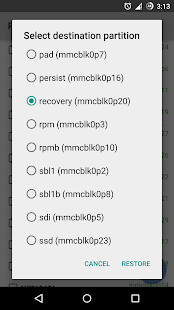
- Select destination partition, pilih recovery


- Pilih RESTORE
- You are about to restore, pilik OKE
- Selesai
- Silahkan reboot ke recovery

0 $type={blogger}: